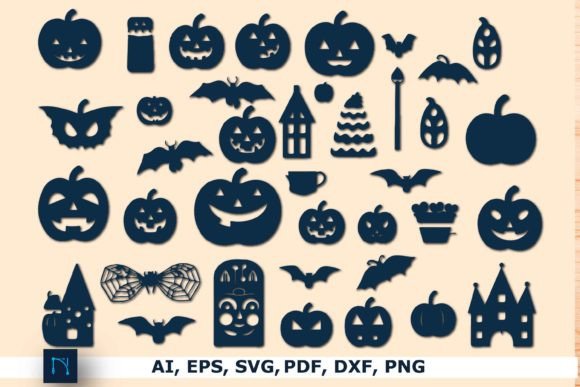
Halloween Frames Bundle: Graphics for Crafts & Content
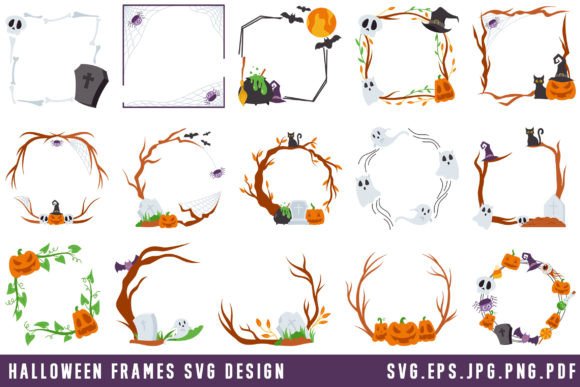
As a blog designer who’s shipped over 200 editorial redesigns and published digital products for lifestyle, education, and affiliate brands, I opened the Halloween Frames Bundle expecting seasonal flair — but what I found was a surprisingly versatile graphic design asset built for real publishing workflows. Not just clipart. Not just decoration. This is a precision-crafted set of 15 Halloween-themed frames, delivered in SVG, EPS, PNG, JPG, and DXF formats — ready to slot into blog graphics, digital guides, newsletter headers, and social media visuals without visual compromise.
The first impression? Playful but polished. These frames lean into classic Halloween motifs — bats, pumpkins, cobwebs, gothic arches — yet avoid cartoonish overload. There’s intentional negative space, balanced weight distribution, and subtle texture in many SVG/PNG variants. That means they support editorial design, not just festive decoration. They feel seasonal without feeling disposable — ideal for content creators targeting October traffic spikes while maintaining brand consistency across newsletters, blog posts, and downloadable printables.
This bundle naturally elevates niches where mood and visual trust matter: parenting blogs sharing printable Halloween activities, online educators building themed lesson kits, small business owners launching limited-edition product launches, or affiliate marketers curating “best Halloween tools” roundups. It reads as creative design, not stock filler — which directly impacts how readers perceive your authority and attention to detail.
Where Halloween Frames Bundle Delivers Real Editorial Value
In my testing across live sites and Canva templates, these frames consistently strengthened visual hierarchy and click-through potential. Here’s where they shine:
- Blog featured images — Framing headlines with a subtle pumpkin border instantly signals seasonality while keeping focus on your copy.
- Pinterest pins — The SVG and high-res PNG files scale beautifully; frames add instant recognizability in crowded feeds.
- Digital guides & lead magnets — Use them as section dividers or cover accents in PDFs and Notion templates — they reinforce theme without overwhelming text.
- Newsletter banners — A single frame around your October CTA boosts scannability and emotional resonance.
- Category thumbnails & website headers — When applied consistently, they build stronger brand identity across seasonal content hubs.
- Social media graphics — Especially effective for Instagram carousels and Facebook event announcements where thematic cohesion builds anticipation.
Crucially, the variety of file types makes integration frictionless. SVGs retain crispness at any size (perfect for responsive web design), PNGs offer transparency for layered layouts, JPGs load fast for email clients, and DXF files open cleanly in Cricut Design Space — bridging digital publishing and physical crafts for hybrid creators.
Where to Proceed Thoughtfully
Like any strong graphic design asset, Halloween Frames Bundle works best when matched to intent — not forced everywhere. Avoid using intricate frames on:
- Small mobile thumbnails (details vanish below 200px width)
- Text-dense blog graphics where contrast suffers (e.g., light frames on pale backgrounds)
- Buses layouts — they compete with icons, buttons, or photo grids
- Serious professional niches (legal, finance, medical) unless used minimally and ironically
- Websites committed to ultra-minimalist visual systems — these frames carry expressive weight
If your site relies on monochrome palettes or strict typography-first principles, test each frame against your primary font pairings before full rollout.
Publisher Notes You’ll Actually Use
Before dropping Halloween Frames Bundle into production, run these checks — I’ve seen too many “perfect” assets fail at the last mile:
- Preview each frame inside your actual blog layout — not just in isolation. Does it breathe beside your headline font?
- Test contrast: place white text over dark-framed areas, black text over light ones. Use browser dev tools to simulate grayscale — does the frame still read clearly?
- Try pairing with serif (e.g., Merriweather), sans serif (e.g., Inter), script (e.g., Pacifico), and display fonts (e.g., Bungee). Some frames harmonize better with hand-drawn or bold type; others suit clean modernity.
- Check file size — especially PNGs. Compress with Squoosh or ShortPixel before uploading to WordPress or email platforms.
- Verify commercial license terms. This is a commercial design asset — confirm usage covers monetized blogs, affiliate pages, and paid digital products like eBooks or Canva templates.
One final note: Because this is a digital download from a creative marketplace, treat it like a foundational tool — not a one-off fix. Reuse frames across multiple touchpoints (e.g., same bat-accented frame on your Pinterest pin, blog header, and downloadable worksheet) to reinforce seasonal recognition and strengthen your visual identity.
Why This Matters Beyond October
Great content marketing isn’t about chasing trends — it’s about building recognizable, trustworthy moments that resonate. The Halloween Frames Bundle supports that by helping you create cohesive, clickable, and confident visuals — whether you’re designing a free printable for subscribers, an affiliate comparison chart, or a branded digital guide. It’s not just about looking festive. It’s about looking intentional.
For bloggers, online educators, and small business branding teams, this is more than a Crafts category download. It’s a flexible, production-ready piece of your design assets toolkit — one that quietly lifts editorial quality, reinforces seasonal relevance, and helps your content stand out where it counts: in feeds, in inboxes, and on screen.